Remote support for law firms · Free
Free remote support for law firms, without session codes.
Lawyerd RMM lets your IT team see the screen, run commands and move files on any Windows PC at the firm. Staff run your organisation’s own signed file once, and a badge on their screen always shows who is connected.
Free · Windows 10 and 11 · Two-step sign-in for every account · Every organisation checked by a person
- In one signed fileWindows 10 and 11
- Remote screenSee and control · sign-in and UAC screens
- Command lineReal PowerShell · winget installs
- FilesUpload and download · any folder
- Permanent accessUnattended · always visible to the user
- JournalEvery session · ticket, time and files
Session codes let anyone in. Attackers know it.
In May 2026 the FBI warned that a data-extortion group, Silent Ransom Group, phones law-firm staff pretending to be their IT department and talks them into starting a remote session with a legitimate support tool. Mandiant saw files searched and taken within an hour.
The tools work exactly as designed: whoever gets the code gets the screen. Antivirus does not flag them, because nothing involved is malware.
Lawyerd RMM has no codes to read out. Each organisation gets its own signed file, and a computer that runs it can be reached only by that organisation’s technicians. Staff know the one file to trust, so a caller asking for a code or a different download stands out. While anyone is connected, a badge on the screen shows their name and firm, with an End button.
Sources: FBI FLASH-20260526-01, 26 May 2026 · Mandiant, “Seeking Counsel”, 6 June 2026 · How Lawyerd protects law firms
Everything a support desk needs, nothing it does not.
The essentials of GoTo Resolve or N-able, made for a firm’s IT person rather than a call centre.
-
Remote screen
See the screen and take control.
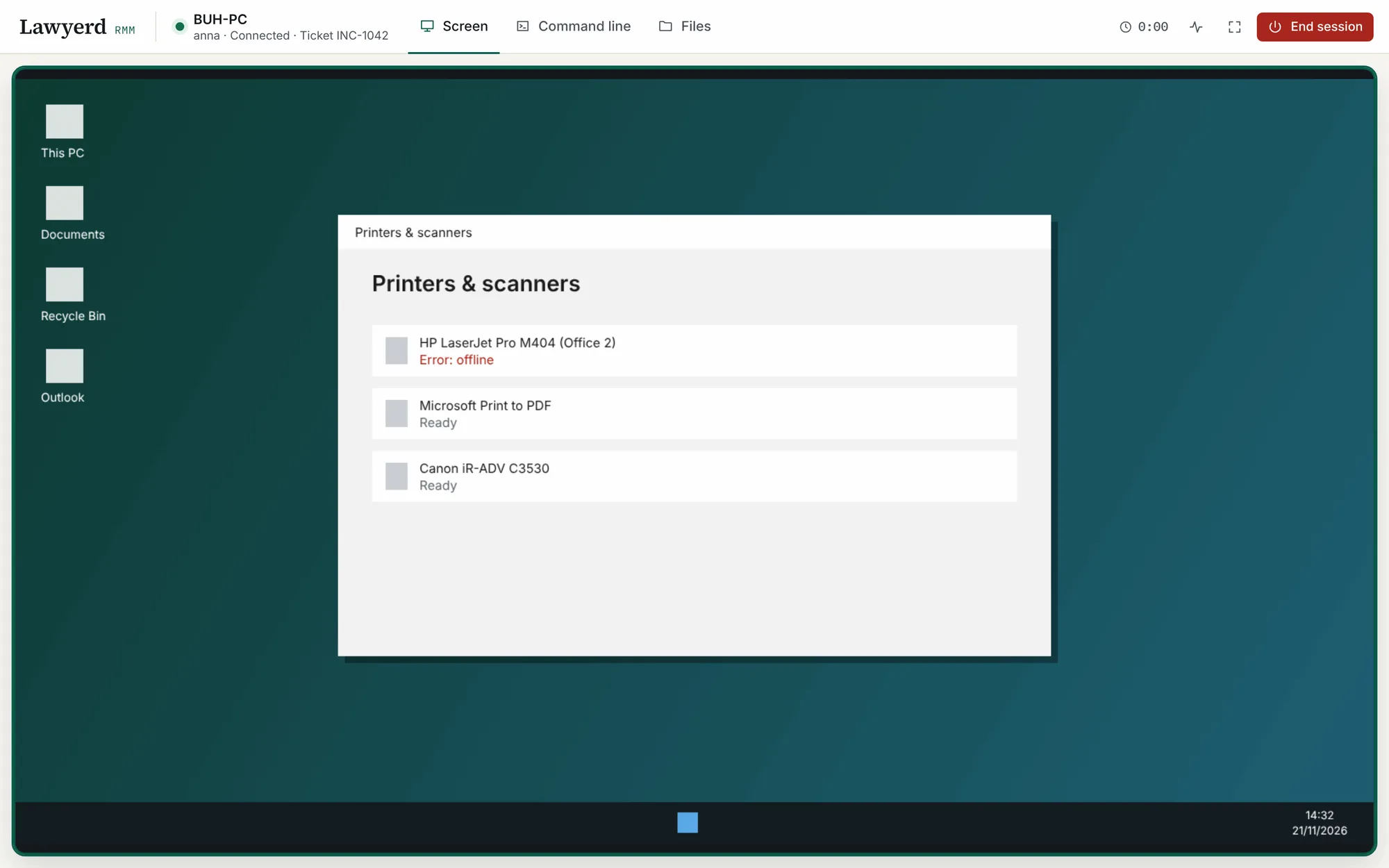
Smooth H.264 video from the encoder built into Windows, sending only what changes. Mouse and keyboard work as if you were at the desk, including the sign-in screen and UAC prompts on computers with permanent access.
-
Command line
A real PowerShell console in your browser.
Run winget, scripts and installers with live progress. Save quick commands, such as Install Claude Desktop, and run them on any computer in one click.
-
Files
Move files both ways.
Browse folders, download logs and documents, upload installers. An upload lands in full or not at all, never as half a file.
-
One link
Send a link, help right away.
Share your organisation’s link by email or on the intranet. Whoever runs the file appears in Computers, ready to connect, and you can add a ticket number to each session. Without administrator rights, they wait in Waiting for help.
-
Permanent access
Reach computers when nobody is there.
The file installs a small Windows service, so you can help again tomorrow without asking anyone to run anything. Administrators can install it silently on staff PCs. Remove the computer in the cabinet and it uninstalls itself.
-
Team and journal
Roles, groups and a full record.
Owners, administrators and technicians. Groups decide who reaches which computers. The journal lists every session with the technician, ticket, duration and files, and exports to CSV.
From sign-up to the first session in four steps.
-
Create your organisation
Sign up with your work email, confirm it and set up two-step sign-in. A person at Lawyerd checks every new organisation before it can connect to anything.
-
Get your signed file
We build Lawyerd Remote for your organisation and sign it with Lawyerd’s code-signing certificate. Share its permanent link by email or on the intranet.
-
They run it once
Windows asks for permission, they press Yes, and a message says Lawyerd Remote is installed. The computer appears in your Computers list. Without administrator rights, a support window opens instead.
-
You connect
Click Connect and the session starts. A badge in the corner of their screen shows your name and organisation, and they can end the session at any time.

Screen, command line and files in one browser tab.
Technicians need nothing but a browser, on a computer or a phone.


Built for firms that hold other people’s secrets.
-
Verified organisations only
A person at Lawyerd checks every new organisation before it can connect to a single computer. Disposable email addresses and automated sign-ups are refused.
-
Always visible, easy to end
A badge on the screen shows who is connected and from which organisation, with an End button. Firms that want a yes every time turn on Ask the user before every connection; no answer means no.
-
Two‑step sign‑in for everyone
Every account, ours included, signs in with an authenticator app. Removing a computer or changing who has access asks for a fresh code.
-
One signed file
Code-signed by Lawyerd with Microsoft Artifact Signing and scanned with Microsoft Defender before release. A single native program, with no third-party libraries.
-
Keys you can rotate
If your file ends up where it should not, rotate the key: every old copy and link stops working at once.
-
Screens are not recorded
Video is relayed live and never stored. The journal keeps who connected, when, for how long and which files moved.
-
No back door for us
Lawyerd staff cannot sign in as you, watch your sessions or run commands on your computers. Our admin tools have no such buttons.
-
An audit log that only grows
Sign-ins, invitations, role changes and sessions are written to an append-only log that your administrators can review.
Lawyerd is a company registered in Poland. Connections are encrypted with TLS, and these pages load no third-party scripts or fonts; the only exception is Cloudflare Turnstile on the sign-up form, which keeps bots out.
What changes compared with code-based tools.
| Question | Code-based remote tools | Lawyerd RMM |
|---|---|---|
| How a session starts | The person reads out a code or ID to whoever is on the phone | The person runs your organisation’s file once; your technicians connect from the cabinet |
| Who can connect | Anyone who has the code | Technicians of your organisation, checked by Lawyerd |
| Who the person sees connecting | An ID, or whatever name the caller typed | The technician and your organisation’s name, approved by Lawyerd, on a badge with an End button |
| Two-step sign-in | Often optional | Required for every account |
| Record of sessions | Depends on the plan | Every session, with ticket, duration and files |
| Price | Usually per technician, per month | Free |
Asked by firms and their IT providers.
Is Lawyerd RMM really free?
Yes. Creating an organisation and using Lawyerd RMM costs nothing, and you are not asked for a payment card.
How is it different from AnyDesk, TeamViewer or Quick Assist?
Those tools connect whoever has the code or ID, which is exactly what fake IT callers rely on. Lawyerd RMM has no session codes: each organisation has its own signed file, only that organisation’s technicians can reach a computer that runs it, and a badge on the screen shows who is connected.
Does the person who needs help have to install anything?
Once. They run your organisation’s file and press Yes when Windows asks; a message then says Lawyerd Remote is installed, and you can help them today and later without sending anything new. Without administrator rights, a support window opens instead and you can help while it is open. To remove it: Settings → Apps → Lawyerd Remote.
Will people know when we are connected?
Yes. While a technician is connected, a small badge in the corner of the screen shows their name and organisation, with an End button. If you want people to approve every connection, turn on Ask the user before every connection in Settings.
Which computers does it work on?
The computer being helped runs Windows 10 or Windows 11. Technicians work in a current browser such as Chrome, Edge, Firefox or Safari, on a computer or a phone. Other operating systems are not supported yet.
Can we install software such as Claude Desktop remotely?
Yes. The command line is a real PowerShell console, so winget runs with live progress. Save winget install --id Anthropic.Claude as a quick command and run it on any computer in one click.
Can Lawyerd see our screens or files?
No. Our admin tools cannot sign in as you, watch your sessions or run commands on your computers. Screens are relayed live and are not recorded.
What if someone leaves, or the file is shared too widely?
Remove the person in Team and their access ends at once. If the file itself has gone too far, rotate your organisation’s key: every old copy and link stops working, and you get a new file.
Can an IT provider use it for several law firms?
Yes. Create one organisation for your company and use groups to keep each client’s computers apart and decide which technicians can reach them.
Who is behind Lawyerd RMM?
Lawyerd, a company registered in Poland that works on content removal and security for law firms. The same team builds Lawyerd for Law Firms, which protects firms against fake IT support calls.
Give your firm remote support it can trust.
Free. Signing up takes about two minutes, and we check every organisation before it goes live.
- 01Create your organisation and set up two-step sign-in
- 02We check it and build your signed file
- 03Share the link and help your first colleague